yCyclista: a WordPress gallery carousel plugin that allows slideshows, transitions, etc – now with captions!
UPDATE 3 (Dec 23, 2010): I’ve released yCyclista v1.2.3, implementing user suggestions from the comments below. See the readme for complete changelog.
UPDATE 2: I’ve released yCyclista v1.2.2, fixing some old bugs and adding the “exclude” option. See the readme for complete changelog.
UPDATE: I’ve released yCyclista v1.2 now with captions! Thanks to support from people out there, I was able to work on this quickly and bring it up to date without waiting too long.
EDIT: Power users, download the latest plugin from the wordpress plugin exchange, and vote if you like it! See the demo right here.
We’re happy to announce the publication of our first plugin, yCyclista. yCyclista overwrites your normal WordPress gallery with the jQuery Cycle plugin, allowing tons of cool carousel effects, slideshows, and so on. This is our first version (ed: and my first plugin – yonatan reinberg), so please feel free to comment, ask questions and share with your best friends!
We recently had a client that needed a dynamic way to insert their own jcarousel/carousel-style slideshows, both automatic and manual (ie click-through). Realizing we couldn’t find what we needed on the web, we decided to develop it and share it! (we’re even using it here on Social Ink’s portfolio of non-profits and educational institutions in NYC. Have a look around, thanks very much!)
Our yCyclista plugin overwrites WordPress’s basic gallery function with malsup’s jQuery Cycle plugin, allowing the lay user to dynamically add slideshows or clickthrough galleries to their site!
To use, download the plugin and copy the ycyclista directory to your wp-content/plugins directory. Go to your blog’s Plugins section and activate. Then navigate to the settings menu:
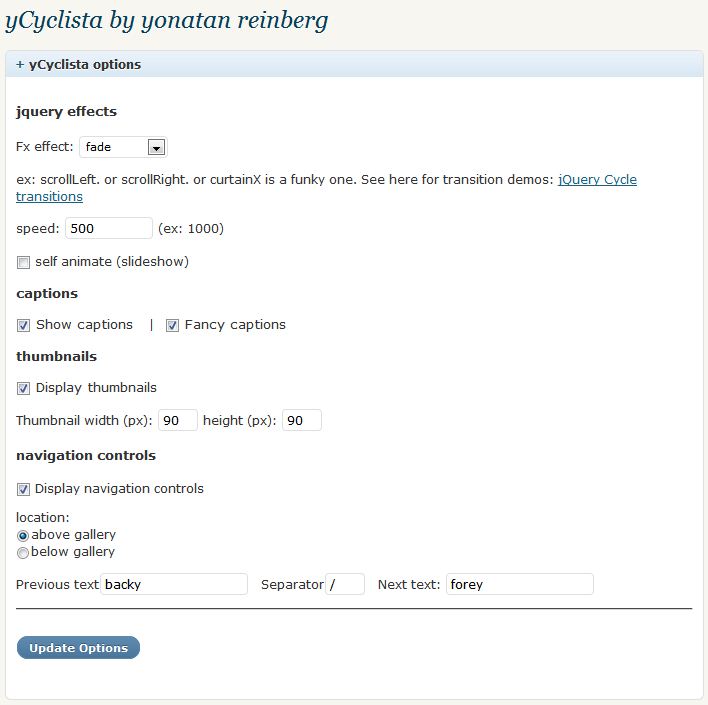
Choose the appropriate options: a transition effect (examples of many effects are available here). A speed for the transition. Finally, check if you want it a slideshow or a manual gallery. If you select a slideshow, with a transition of slideDown, for example, everything will happen on its own. If you uncheck this box, the user will have to click on the image to go to the next one.
The following section is for thumbnails: Do you want a mini thumbnail navigation section? If so, enter dimensions for your thumbnails, or leave blank to use the WordPress defaults. Note that yCyclista will always display the full images at the size marked in your Settings > Media panel. If you find your images are too small, you’ll need to change it there. We also provide a whole host of styles (in ycyclista.css, in the plugin directory) which you can use to style your gallery exactly how you want. By the way, some transitions conflict with WP’s gallery and won’t work.
The following section is for the next/previous navigation: select the checkbox if you want navigation on. Then choose if you want it above the gallery (above the large image, NOT above the thumbnails) or below the thumbnails. Currently you can’t have them in the middle. Finally give your text labels (next/previous, go forward/go back, next item/previous item).
FAQ
How do I change the location of things or how they look (eg add an image to the next/previous)?
CSS is your friend. Add a background image to yc_next and yc_prev… Move margin-tops (ha!). If you need me to do a custom version of this with everything suited for your needs, please contact me at through our contact form or email me at yoni@social-ink.net. Note we will not respond to basic plugin support through emails, only through comments at this page.
Why isn’t it animating?
As stated above, many things don’t play well with WP’s gallery feature. Visit our support page at https://social-ink.net/blog/ycyclista-a-plugin-for-your-wordpress-gallery-that-allows-slideshows-transitions-etc and post your comments.
Can I click on the image to move to the next one?
Only if you disable navigation controls. It’s not compatible. Explaining this to you would absolutely blow your mind apart.
Can I have more than one gallery on one page
Nope. So if you have a category listing showing many posts’ galleries, only the first on the page will work. Can’t call it twice. If you need it called twice you can contact me because that’s a real custom job.
I have fancycaptions turned on, and the grey background goes across my whole page
The plugin tries to use fancy jq to divine the appropriate width, but if that doesn’t work, go to your backend and navigate to the Settings – Media page in your WP install, and change the max width for the “Large size” to the width of your images.
The thumbnails look all squishy!
yCyclista doesn’t generate any thumbnails, it only hooks into the WP gallery feature, which in turn generates thumbnails itself based on the settings in the backend, under Settings > Media. The squishiness lies there, friend! For example, if under there you have thumbnail size to 150×150 (the WP default), the plugin takes these WP-generated thumbs and then compresses them further to the size in the yCyclista backend. for smoothest results, then, the yCyclista settings thumb size AND the WP thumb size should be the same (and you need to reupload your gallery every time you change the WP thumb size so it can regenerate these images).
My thumbnails are checked, but they’re not showing
Is animation checked? It’s not designed to show thumbnails when it animates (kind of redundant).
Can I exclude any images from the gallery?
Now you can! Use the general WP shortcode [gallery exclude=”ID”] where ID is the picture “attachment ID”. If you know a little HTML/CSS, you can check the id of the image from the frontend (eg “ycycle_pic_12” means attachment 12), and use that. If you want it through the backend, the easiest way is to go to Media > Library, hover over an image, and look in your statusbar, you’ll see the id. It’s a bit annoying but its the only way I know to find the ID easily. (eg you hover over an image and see “http://your-site.com/wp-admin/media.php?attachment_id=17&action=edit” in the bar; the ID of that image is 17).
Use [gallery exclude=”17″] or for multiple, [gallery exclude=”15,19″]] etc.
Does this use the same features as the jcarousel jQuery plugin?
No, there are many carousel/cycling plugins for jQuery. We used this one because we felt it was the lightest and easiest. It has lots of options and great (little) overhead. If you’re interested in using a different one, drop us a line.
yCyclista by Yonatan Reinberg has been tested on all the latest versions of FireFox, Chrome, and, why not, Internet Explorer. It also validates 100% as HTML5, etc. Note too, as with every plugin or theme modification, you should do a backup of your files beforehand. Although we’ve tested this across many installs, we are not responsible for anything it does to your system and do not guarantee support.
Download v1.2.3 here from social ink’s site(63k zip) (v1.2.2/v1.1) or go to the wordpress plugin directory for yCyclista. See it in action here or by browsing our portfolio items below. Stay updated with all the latest plugin news by signing up for our email newsletter (below in the footer).
Go ahead and install, and leave your comments and questions below! If you’re so inclined, please buy us a beer and we can blow off steam to cover the hours making this plugin! Carousel away!